
How long a laptop battery lasts depends on two things: about 6 to 12 hours per charge for typical use, and roughly 2 to 4 years (300 to 500 full cycles) before capacity fades noticeably. Gaming and creator laptops run shorter, while thin ultrabooks and many Apple laptops run longer.
How many hours a laptop battery lasts per charge
Runtime on one charge varies more by laptop type and workload than by brand. Manufacturer figures usually come from light, lab-style tests (video playback or low-brightness browsing), so real-world runtime is often 60 to 80 percent of the advertised number.
| Laptop type | Typical runtime (mixed use) | Heavy use |
|---|---|---|
| Ultrabook / thin-and-light | 8 to 14 hours | 5 to 8 hours |
| Mainstream 14-15 inch | 6 to 10 hours | 3 to 6 hours |
| Chromebook | 8 to 12 hours | 5 to 8 hours |
| MacBook (Apple silicon) | 10 to 18 hours | 6 to 10 hours |
| Gaming laptop | 3 to 6 hours | 1 to 2 hours while gaming |
| Mobile workstation | 4 to 8 hours | 1 to 3 hours |
These are ranges, not guarantees. Battery size (measured in watt-hours, Wh), screen type, and processor efficiency all change the result, so check the specific model’s spec sheet and independent reviews.
How long a laptop battery lasts before it wears out
Lifespan is a separate question from runtime. Lithium-ion batteries lose capacity a little with every charge cycle and with age, even if the laptop sits unused.
- Typical Windows laptop: about 300 to 500 full charge cycles before capacity drops to around 80 percent of original. That is roughly 2 to 4 years for most people.
- MacBooks: Apple designs recent models to keep 80 percent capacity at 1,000 cycles, so 4 to 6 years of useful life is common.
- Light users who keep the laptop plugged in most of the time can see the battery last longer in cycle terms but still age from heat and time.
A cycle means using 100 percent of the battery’s capacity in total, not necessarily in one go. Going from 100 to 50 percent twice counts as one cycle.
Wear is gradual. You won’t see a sudden cutoff; instead, a battery that gave 9 hours new may give 6 hours after two years, then 4 hours after four. Many people replace the laptop or battery when runtime becomes inconvenient, not when the battery fails completely.
What drains a laptop battery faster
If your battery seems to die early, one of these is usually the cause:
- Screen brightness. The display is often the largest power draw. Dropping brightness from 100 percent to about 50 percent can add an hour or more on many models.
- High refresh rate. 120 Hz or 144 Hz panels use more power than 60 Hz. Many laptops let you switch down on battery.
- Discrete graphics. Gaming, 3D, and video-editing work wake the dedicated GPU and can cut runtime by half or more.
- Video calls and many browser tabs. Camera, microphone, and background tabs keep the processor busy.
- Background apps. Cloud syncing, indexing after an update, and startup programs all draw power.
- Heat. A hot laptop runs fans harder and ages the battery faster.
- Wireless extras. Bluetooth accessories, mobile hotspot use, and a USB-powered device all add load.
If battery life matters most to you, shop with that in mind. Our picks for the best laptops for students and the best laptops for work are good places to compare models built for all-day use, while gaming laptops trade runtime for performance.
How to check your laptop battery health
You can measure how much capacity your battery has lost in a couple of minutes, without installing anything.
On Windows 10 or 11
- Right-click the Start button and open Terminal or Command Prompt.
- Type powercfg /batteryreport and press Enter.
- Open the HTML file it saves (the path is shown on screen) in your browser.
- Compare Design Capacity with Full Charge Capacity. If the full charge number is below about 70 to 80 percent of design, the battery is noticeably worn.
Many manufacturers, including Dell, HP, Lenovo, and ASUS, also include a battery health tool in their support app.
On a Mac
- Open System Settings and choose Battery.
- Look at Battery Health and select the info button for maximum capacity.
- For cycle count, hold Option, click the Apple menu, open System Information, then choose Power.
Apple labels a battery with a service recommendation once maximum capacity falls well below its design level. Exact thresholds differ by model.
How to make your laptop battery last longer
You can’t stop wear entirely, but these habits slow it down and stretch each charge.
- Use a charge limit if your laptop has one. Many Lenovo, ASUS, Dell, HP, and Samsung models can cap charging at 80 percent in their settings app, and recent macOS versions offer similar optimized charging. Staying between roughly 20 and 80 percent reduces stress on the cell.
- Keep it cool. Heat is the biggest long-term enemy. Don’t run it on a bed or couch where vents get blocked. A raised stand improves airflow; see our guide to adjustable ergonomic laptop stands for options that also help posture.
- Use the built-in battery saver. Windows Battery Saver or the Best Power Efficiency mode, and macOS Low Power Mode, can add a meaningful amount of runtime for light tasks.
- Lower brightness and refresh rate when unplugged.
- Close heavy apps and extra browser tabs and turn off Bluetooth when it is not needed.
- Install updates. Firmware and driver updates sometimes include power-management fixes.
- Store it properly. If it will sit for weeks, leave it at about 50 percent charge, powered off, in a cool, dry place.
Leaving a modern laptop plugged in is generally fine because the charging circuit stops at full. The concern is heat, not the cable itself, so a charge cap helps if you are docked most of the day.
When to replace the battery or the laptop
Consider replacing the battery when you see one or more of these signs:
- Runtime has dropped to less than half of what it used to be.
- The laptop shuts off suddenly at 20 to 30 percent.
- The Windows battery report or Mac Battery Health shows a service warning or capacity below roughly 70 to 80 percent.
- The battery percentage jumps or the laptop will not charge.
Safety first: if the base bulges, the trackpad lifts, or the case warps, stop using and charging the laptop and have it serviced. A swollen lithium-ion battery can be a fire risk. Do not puncture it, and take it to an electronics recycler rather than throwing it in the trash.
Whether replacing the battery is practical depends on the model. Some laptops have a battery you can swap with a few screws, while others have it glued in, which makes professional service the safer choice. Check the manufacturer’s warranty first; many cover batteries for one year, and some extend coverage if capacity falls below a set level.
If a replacement costs close to half the price of a new machine, or the laptop is also slow, it may be time to upgrade. When you do, look at battery size in Wh, independent runtime reviews, and efficient processors, not just the advertised hours.
Our Top Picks
Ready to shop? These are the top-rated options from our hands-on roundup, Best Laptops For Developers of 2026.
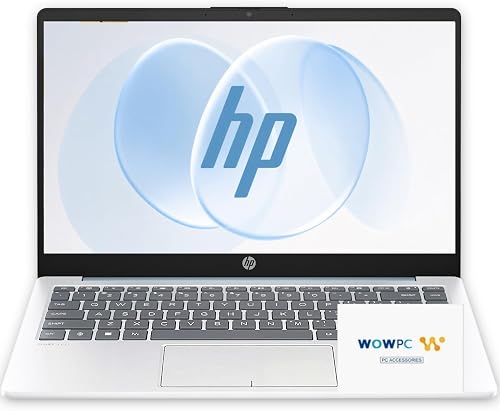
HP UltraBook 14" Laptop, AMD Athlon, 4GB RAM, 128GB SSD

Dell Pro 16 Plus (AMD Ryzen 5, 16GB RAM, 512GB SSD)
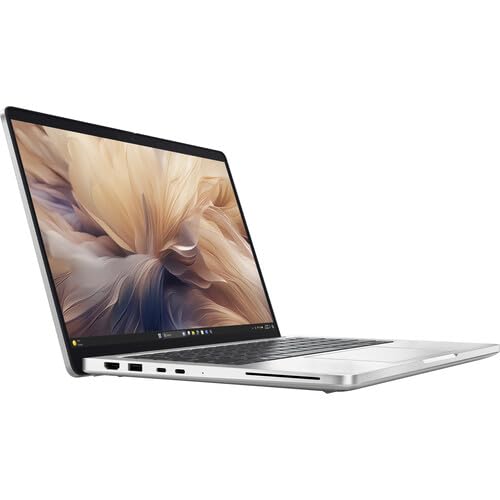
Dell Pro 14 Plus PB14250 Laptop 14" FHD+ Intel Core Ultra 7 16GB 512GB
As an Amazon Associate we earn from qualifying purchases. Product prices and availability are accurate as of the date/time indicated.
Frequently Asked Questions
How many hours should a laptop battery last on a full charge?
Most laptops last 6 to 12 hours on light tasks like browsing and documents. Gaming or video editing can cut that to 1 to 4 hours. Real-world results are typically lower than the manufacturer’s advertised figure.
How many years does a laptop battery last?
Most laptop batteries last 2 to 4 years, or about 300 to 500 full charge cycles, before dropping to around 80 percent capacity. Many MacBooks are rated for 1,000 cycles and often last longer. Heat and age affect the result.
Is it bad to leave a laptop plugged in all the time?
Usually not, because modern laptops stop charging at 100 percent. The risk is heat and sitting at full charge for long periods. Using a built-in 80 percent charge limit and keeping vents clear helps protect the battery.
Can I replace a laptop battery myself?
It depends on the model. Some laptops have screw-in batteries that are easy to swap, while others are glued in and best serviced by a professional. Check your manual and warranty first, and use a compatible battery from a reputable source.