
Why You Need a Reliable Router in 2026
Buffering, dead zones, and laggy connections can turn your smart home into a frustration zone. Whether you’re streaming 4K, gaming online, or managing dozens of IoT devices, a quality router is the backbone of your network. We’ve analyzed 9 of the top routers on the market in October 2026, covering brands like TP-Link, GL.iNet, NETGEAR and more. This guide helps you choose the right model based on your home size, internet speed, and budget. For more tips on setting up your home network, check out our Tech Setup Guide for Your New Home.
We evaluated each router based on specs, user feedback, and value. From Wi-Fi 6 to the latest Wi-Fi 7, our picks span a range of prices and features. Whether you need a budget-friendly upgrade or a premium mesh system, this roundup has you covered.
Pros
- Exceptional VPN performance with WireGuard and OpenVPN
- Dual 2.5G ports for future-proof wired networking
- OpenWrt pre-installed for advanced customization
- Strong Wi-Fi 6 coverage and speed
- Handles many devices without slowdown
Cons
- No built-in modem for cable internet
- Plastic build may feel less premium
- Setup may be complex for non-technical users
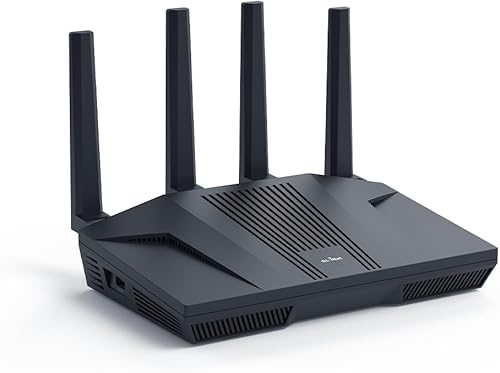
The GL.iNet GL-MT6000 Flint 2 is a powerful Wi-Fi 6 gaming router designed for users who demand top-tier performance and advanced network control. With dual 2.5G multi-gig ports and 8-stream Wi-Fi 6 technology, it delivers combined speeds up to 6 Gbps, making it ideal for lag-free gaming, 4K streaming, and heavy multitasking. Pre-installed with OpenWrt, it offers unparalleled customization options for power users and network enthusiasts.
This router is best suited for gamers, streamers, and tech-savvy users who need high-speed VPN capabilities. The Flint 2 achieves WireGuard VPN speeds up to 900 Mbps and OpenVPN up to 880 Mbps, ensuring secure connections without sacrificing performance. It also supports AdGuard Home, allowing you to block ads and trackers across your entire network for a cleaner, safer online experience.
Build quality is solid with a plastic chassis that keeps weight down to just 1.7 lbs. The router features a sleek, low-profile design with ample ventilation. Connectivity is a standout: two 2.5G ports (one WAN, one LAN) and four Gigabit LAN ports provide plenty of wired options for high-speed devices. The 1GB DDR4 RAM and 8GB eMMC storage ensure smooth operation even with over 100 connected devices.
One drawback is the lack of a built-in modem, so you will need a separate cable or fiber modem. The plastic construction might not feel as premium as metal alternatives, but it keeps the router affordable and lightweight. Additionally, the initial setup can be daunting for non-technical users, though GL.iNet provides a helpful video tutorial.
Overall, the GL.iNet GL-MT6000 Flint 2 is an excellent choice for those who prioritize VPN speed, network customization, and future-proof wired connectivity. It offers exceptional value for its price point and is a top contender in the gaming router category.
Pros
- Fast Wi-Fi 6 Performance
- Excellent Range and Coverage
- Easy Setup with Tether App
- Built-in Security Features
- Alexa Compatible
Cons
- No 2.5G WAN Port
- Limited Advanced Security Without Subscription
- Large Size May Not Fit Small Spaces
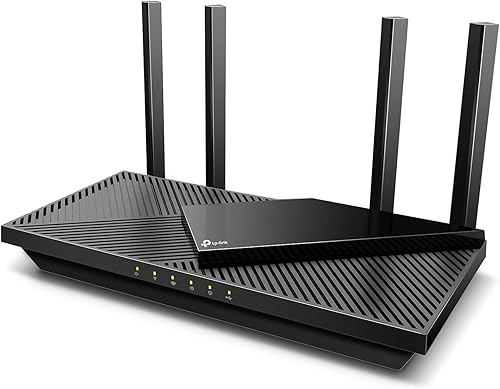
The TP-Link Archer AX55 is a dual-band AX3000 Wi-Fi 6 router designed to upgrade your home network with faster speeds, lower latency, and improved capacity. It is an excellent choice for households with multiple devices, gamers, and streamers who demand reliable performance.
Standout features include OFDMA and MU-MIMO technologies that allow multiple devices to communicate simultaneously without lag, and four high-gain antennas with Beamforming that extend strong Wi-Fi signals to every corner of your home. The router also supports TP-Link HomeShield, which provides basic security scanning and parental controls to protect your network.
Setup is straightforward with the Tether App, and the router is compatible with Amazon Alexa for voice commands. The improved cooling design ensures the system stays cool under load, preventing performance throttling.
While the Archer AX55 lacks a 2.5G WAN port and advanced security features require a subscription, its overall performance and value make it a top contender in the mid-range Wi-Fi 6 router market.
Overall, the TP-Link Archer AX55 delivers impressive speed, wide coverage, and essential security at a competitive price point, making it a solid investment for anyone looking to future-proof their home network.
| Connectivity | WiFi 6 (802.11ax) |
|---|---|
| Network Speed | AX3000 (2402 Mbps + 574 Mbps) |
| Power Source | Corded Electric (AC 100-240V) |
| Warranty | Manufacturer warranty (duration not stated) |
| Best For | Whole-Home Wi-Fi 6 |

Pros
- Affordable way to upgrade to Wi-Fi 7 without moving to a tri-band router
- Dual 2.5Gbps ports offer future-proof multi-gig wired performance
- Covers up to 2,000 sq ft and supports easy mesh expansion
- HomeShield adds strong security, parental controls, and IoT protection
- Simple setup and management with the Tether app
Cons
- Dual-band design does not support the 6 GHz band
- Range can be reduced by walls and physical obstacles
- A separate modem is required for most internet providers
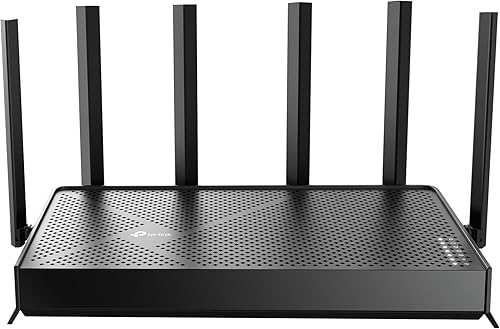
The TP-Link Archer BE230 is a dual-band Wi-Fi 7 router designed to bring next-generation wireless performance to everyday homes. It delivers combined speeds up to 3.6 Gbps on the 2.4 GHz and 5 GHz bands, which is enough for 4K and 8K streaming, AR/VR gaming, and heavy multi-device use. It does not support the 6 GHz band, but it still provides meaningful upgrades over Wi-Fi 6 through Multi-Link Operation, Multi-RU, and 4K-QAM.
This router is best for households that want an affordable path into Wi-Fi 7 without jumping to a tri-band model. With coverage up to 2,000 square feet and support for up to 60 devices, it suits medium-sized homes and growing smart home setups. The dual 2.5Gbps ports are a standout feature, allowing multi-gig internet plans and wired devices to perform at full speed.
Setup is simple through the TP-Link Tether app, and EasyMesh compatibility lets you expand coverage with additional TP-Link EasyMesh routers or range extenders. HomeShield adds network security, parental controls, and real-time IoT protection. Four antennas plus beamforming help focus the signal toward hard-to-reach areas, though actual range can be affected by walls and obstacles.
Some buyers should note that this is a dual-band router, so there is no 6 GHz channel, and a separate modem is required for most internet providers. The quad-core 2.0 GHz processor keeps things responsive even with multiple active devices, but placement still matters for the best performance.
Overall, the Archer BE230 is a strong value for anyone looking to future-proof their home network without overpaying. It combines Wi-Fi 7 features, multi-gig wired ports, mesh expandability, and solid security in one compact router.
Pros
- Cutting-edge Wi-Fi 7 for future devices
- Excellent coverage and device capacity
- Dual 2.5Gbps ports for high-speed wired connections
- Robust built-in security features
- Easy setup and management via app
Cons
- Dual-band only, no 6GHz band for less interference
- No Wi-Fi 6E support for older devices
- Warranty duration not specified
The TP-Link Archer BE400 is a dual-band Wi-Fi 7 router designed to bring next-generation wireless performance to your home network. With a combined speed of BE6500 (up to 5764 Mbps on 5GHz and 688 Mbps on 2.4GHz), it delivers exceptional throughput for bandwidth-intensive tasks like 4K/8K streaming, AR/VR gaming, and large file transfers. The router features Multi-Link Operation (MLO) and 4K-QAM, ensuring low latency and reliable connections for multiple devices simultaneously.
This router is ideal for households with many connected devices, as it can cover up to 2,400 square feet and support up to 90 devices at once. The six high-performance antennas and beamforming technology provide strong, consistent coverage throughout your home. For wired connections, it includes dual 2.5Gbps ports (one WAN/LAN and one LAN) plus three 1Gbps LAN ports, making it suitable for multi-gig internet plans and high-speed local networking.
Security is a key highlight: the Archer BE400 comes with TP-Link HomeShield, offering real-time network scanning, parental controls, and a private IoT network to isolate smart home devices from your main network. It also supports WPA3 encryption and includes VPN client and server capabilities for added privacy. Setup is straightforward using the Tether app, and TP-Link provides free expert support via phone and email.
Design-wise, the router has a compact footprint (10.6 x 6 x 1.9 inches) and can be placed on a desk or shelf. It lacks a 6GHz band, which means it cannot take full advantage of the wider channels available on tri-band Wi-Fi 7 routers, but for most users the dual-band performance will be more than adequate. The warranty duration is not explicitly stated, but TP-Link's customer support is known for being responsive.
Overall, the TP-Link Archer BE400 is a solid choice for anyone looking to upgrade to Wi-Fi 7 without breaking the bank. It offers excellent speed, coverage, and security features at a competitive price, making it a great value for future-proofing your home network.
Pros
- Exceptional Wi-Fi 7 speed for demanding tasks
- Wide coverage area suitable for large homes
- Supports a high number of connected devices
- Easy to expand with existing eero systems
- Reliable TrueMesh technology for consistent performance
Cons
- Premium price point may be high for some budgets
- Only two Ethernet ports limits wired connections
- No USB port for local network storage
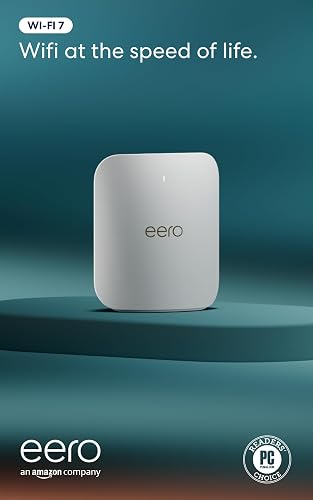
The Amazon eero Pro 7 is a tri-band mesh Wi-Fi 7 router designed for users who demand top-tier speed and reliability. With wireless speeds up to 3.9 Gbps and support for internet plans up to 5 Gbps, it handles 4K streaming, online gaming, and large file transfers with ease. The router covers up to 2,000 sq. ft., making it suitable for spacious homes or small to medium-sized businesses.
One of its standout features is the ability to connect over 200 devices simultaneously without performance degradation. The dual auto-sensing 5 GbE ports provide fast wired connections for gaming PCs or NAS drives. The eero Pro 7 also leverages Wi-Fi 7's multi-link operation (MLO) for reduced latency and more stable connections.
Setup is straightforward using the eero app, and the router is backward compatible with all previous eero generations, allowing you to expand your mesh network as needed. The patented TrueMesh software continuously optimizes your network by steering devices to the best band and channel.
Build quality is solid, though the router lacks USB ports for local storage sharing. The price is on the higher end, but the 3-year warranty and responsive US-based support add value. Overall, the eero Pro 7 is a future-proof choice for users with high-bandwidth needs and a large number of devices.

Pros
- Exceptional Wi-Fi 6 speeds for 4K/8K streaming and gaming
- 2.5G port future-proofs your network for multi-gig ISP plans
- Strong coverage with eight antennas and Beamforming
- Easy mesh expansion via OneMesh without needing a new system
- Robust security suite with HomeShield (free basic tier included)
Cons
- No USB ports for sharing storage or printers
- HomeShield advanced features require a paid subscription
- Limited advanced configuration options for power users
The TP-Link Archer AX80 (AX6000) is a dual-band Wi-Fi 6 router designed to handle the demands of modern smart homes. It delivers combined wireless speeds of up to 4804 Mbps on the 5 GHz band and 1148 Mbps on the 2.4 GHz band, making it an excellent choice for 4K/8K streaming, online gaming, and heavy video conferencing. Its standout feature is the 2.5G multi-gigabit WAN/LAN port, which ensures that even the fastest fiber internet plans won't be bottlenecked by the router.
This router is ideal for large households with many connected devices. With MU-MIMO and OFDMA technologies, it can handle simultaneous data streams to multiple gadgets without noticeable lag. The eight high-gain antennas and Beamforming technology provide strong, reliable coverage across large homes, and the OneMesh feature allows you to add compatible range extenders to create a seamless whole-home mesh network without replacing the router.
Security is a priority with TP-Link's HomeShield. The free tier includes basic network security scans, IoT device identification, parental controls, and quality of service (QoS) management. For advanced features like real-time threat prevention and detailed usage reports, a HomeShield Pro subscription is required. Additionally, the router supports VPN client functionality, letting you secure all devices on your network with a single VPN connection.
Build quality is solid with a sleek, low-profile design that blends into most living spaces. The router is compatible with all major internet service providers and works with Amazon Alexa for voice control. However, it lacks USB ports for sharing storage or printers, and advanced users may find the configuration options somewhat limited compared to more enthusiast-oriented routers.
Overall, the TP-Link Archer AX80 offers outstanding performance and future-proofing for its price. It's a strong recommendation for anyone who needs fast, reliable Wi-Fi 6 coverage across a large home and wants the flexibility to expand with OneMesh. The 2.5G port is a valuable addition for those with multi-gig internet, and the built-in security features add peace of mind out of the box.

Pros
- Dedicated 6GHz band for interference-free performance
- Fast 2.5 Gbps WAN port for high-speed wired connections
- Strong coverage with 6 antennas and Beamforming
- EasyMesh support for flexible network expansion
- VPN server and client built in
Cons
- No USB 3.0 port for storage sharing
- Lacks multi-gig LAN ports beyond the single WAN port
- HomeShield advanced features require subscription
The TP-Link Archer AXE75 is a tri-band WiFi 6E router that brings the latest wireless technology to your home network. With a dedicated 6GHz band, it offers a clear channel free from interference from older devices, resulting in faster speeds and lower latency for demanding tasks like 4K/8K streaming, AR/VR gaming, and video conferencing. The router achieves combined speeds up to 5400 Mbps, ensuring multiple devices can stream, game, and browse simultaneously without slowdowns.
This router is ideal for gamers, streamers, and households with many connected devices. The 2.5 Gbps WAN/LAN port provides a significant boost in wired performance, making it future-proof for high-speed internet plans. Six high-gain antennas with Beamforming technology deliver strong, reliable coverage throughout your home, and EasyMesh compatibility allows you to expand your network seamlessly with additional compatible devices.
Design and build quality are solid, with a unique housing that promotes heat dissipation for long-term reliability. The router includes a 1.0 GHz dual-core CPU and 512 MB of memory for smooth performance. Setup is straightforward via the Tether app, and TP-Link HomeShield offers basic network security and parental controls for free. The router also supports VPN server and client functionality for added privacy.
Potential drawbacks include the lack of a USB 3.0 port for network-attached storage, and only one multi-gig port (the 2.5 Gbps WAN/LAN), which may limit wired speed for multiple devices. Advanced HomeShield features require a subscription. Overall, the Archer AXE75 provides excellent value for those wanting to upgrade to WiFi 6E without breaking the bank.
Pros
- Fast WiFi 7 speeds with BE3600 rating
- Good coverage for medium-sized homes
- Supports up to 50 devices without slowdown
- Multi-gig WAN port future-proofs your network
- Strong security features including WPA3 and Armor
Cons
- Dual-band only, no 6 GHz band for less congestion
- No USB ports for sharing storage or printers
- Requires separate modem, not a gateway replacement
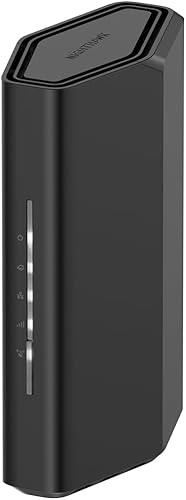
The NETGEAR Nighthawk RS90 is a WiFi 7 dual-band router designed for households that demand fast, reliable WiFi across every room. With BE3600 speeds up to 3.6 Gbps, it handles gaming, 4K streaming, video conferencing, and smart home devices simultaneously without buffering. The router covers up to 2,000 sq. ft. and supports up to 50 devices, making it ideal for medium-sized homes with multiple users.
Key features include a 2.5 Gig WAN port for multi-gig internet plans, four Gigabit LAN ports for wired connections, and WPA3 security with a 30-day trial of NETGEAR Armor to protect all connected devices. Setup is straightforward via the Nighthawk app or a web browser, and the quad-core 2.0 GHz processor ensures smooth performance even under heavy loads.
Build quality is typical of NETGEAR’s Nighthawk line: a compact, vented plastic chassis that stays cool during operation. The router is FCC certified and designed for use in the United States only. It requires a separate modem with an RJ45 Ethernet port, so it won’t replace an all-in-one gateway.
Drawbacks include the lack of a 6 GHz band (tri-band would reduce congestion in dense areas) and no USB ports for network-attached storage. Additionally, larger homes may need a mesh system for complete coverage. However, for its price point, the RS90 offers excellent value for those upgrading to WiFi 7.
Verdict: The NETGEAR Nighthawk RS90 is a strong performer for gamers, streamers, and smart home enthusiasts who want a fast, secure, and easy-to-manage router without breaking the bank.
Pros
- Fastest WiFi 7 speeds for demanding applications
- Future-proof 2.5G ports ensure peak device performance
- EasyMesh compatible for whole-home coverage
- Comprehensive security features with HomeShield
- Easy setup and management via Tether App
Cons
- No USB port for external storage or printer sharing
- Advanced security features require HomeShield Pro subscription
- Large footprint may not fit small spaces
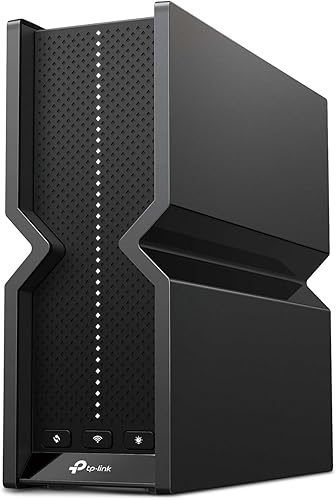
The TP-Link Archer BE550 is a cutting-edge WiFi 7 router that brings the next generation of wireless connectivity to your home. With tri-band speeds up to 9.2 Gbps, full 2.5G ports, and coverage up to 2,000 square feet, it is designed to handle the most demanding tasks like 4K/8K streaming, AR/VR gaming, and large file downloads without buffering.
This router is perfect for tech enthusiasts, gamers, and households with multiple devices. Its EasyMesh compatibility allows you to expand coverage seamlessly by adding other EasyMesh devices, ensuring a strong signal throughout your home. The six internal antennas and Beamforming technology optimize signal strength and reduce interference, providing stable connections even in crowded areas.
Security is a key focus with TP-Link HomeShield, offering comprehensive network protection, parental controls, and IoT security. The ability to create a private IoT network and support for VPN client and server adds extra layers of privacy and safety. Setup is straightforward using the Tether App, and it works with Alexa and Google Assistant for voice control.
However, the Archer BE550 lacks a USB port, which may be a drawback for those wanting to share storage or printers. Some advanced security features require a subscription to HomeShield Pro. Additionally, its size may be a consideration for smaller spaces. Despite these minor cons, the Archer BE550 delivers exceptional performance and future-proofing for your home network.
Buying Guide for 2026
Wi-Fi Standard: Wi-Fi 6 vs Wi-Fi 6E vs Wi-Fi 7
The Wi-Fi standard determines speed, capacity, and future-proofing. Wi-Fi 6 (802.11ax) offers faster speeds and better handling of multiple devices compared to Wi-Fi 5. Wi-Fi 6E adds a dedicated 6 GHz band for less interference. Wi-Fi 7 (802.11be) is the latest, with features like 320 MHz channels and Multi-Link Operation (MLO) for even lower latency and higher throughput. For most homes, a Wi-Fi 6 router is sufficient, but if you have many devices or want the latest tech, consider Wi-Fi 6E or 7.
Band Configuration: Dual-Band vs Tri-Band
Dual-band routers operate on 2.4 GHz and 5 GHz bands, while tri-band routers add a second 5 GHz band (or a 6 GHz band in Wi-Fi 6E/7). Tri-band models reduce congestion when many devices are active, making them ideal for gaming or streaming households. However, dual-band routers are more affordable and still provide solid performance for typical use.
Speed Ratings: What Mbps and Gbps Mean for You
Router speed ratings (e.g., AX3000, BE9300) combine the maximum theoretical speeds of all bands. For example, an AX3000 router might offer 2402 Mbps on 5 GHz and 574 Mbps on 2.4 GHz. These numbers are important for matching your internet plan—if you have gigabit internet, look for routers with at least a 2.5 Gbps WAN port to avoid bottlenecks. For most users, a router rated around AX5400 or BE3600 provides excellent real-world performance.
Coverage and Mesh Expandability
Coverage is measured in square feet, but actual range depends on home layout and materials. Many routers cover 2,000–2,500 sq. ft. For larger homes or multi-story buildings, look for EasyMesh or OneMesh compatibility, which lets you add extenders or satellites to create a seamless whole-home network. Some routers also support mesh systems like eero for easy expansion.
Ports and Connectivity
Check the number and type of Ethernet ports. Multi-gig ports (2.5 Gbps or higher) are essential for future-proofing if your internet plan exceeds 1 Gbps. USB ports allow you to share storage or printers across the network. Also consider if the router supports VPN clients/servers for secure remote access. For smart home setups, a dedicated IoT network can improve security.
Security Features
Modern routers include security suites like TP-Link HomeShield or NETGEAR Armor that protect against malware and intrusions. WPA3 encryption is now standard. Some routers offer parental controls and guest networks. If you value privacy, look for models with built-in VPN support or ad-blocking capabilities (like AdGuard Home on the GL.iNet Flint 2).
Quick Comparison: Side by Side

- – Future-Proof Wi-Fi 7.
- – 2400 sq ft Coverage.
- – Dual 2.5Gbps Ports.
- – Fast Wi-Fi 6 Speeds.
- – Excellent Range Coverage.
- – Easy Tether App Setup.
- – Dedicated 6GHz Band.
- – 2.5 Gbps WAN Port.
- – Strong Coverage.
- – Fast VPN Speeds.
- – Dual 2.5G Ports.
- – OpenWrt Pre-Installed.
- – WiFi 7 Speeds.
- – 2.5G Ports.
- – EasyMesh Coverage.
- – Fast WiFi 6 Speed.
- – 2000 sq. ft. Coverage.
- – Easy Setup.
- – Affordable Wi-Fi 7 Upgrade.
- – Dual 2.5G Ports.
- – 2,000 Sq Ft Coverage.
- – Fast WiFi 7 BE3600.
- – 2,000 sq ft Coverage.
- – 50 Device Capacity.
- – Dual-Band Only.
- – No 6GHz Band.
- – Unspecified Warranty Duration.
- – No 2.5G WAN Port.
- – Limited Free Security.
- – Bulky Design.
- – No USB 3.0 Port.
- – Single Multi-Gig Port.
- – Subscription for Advanced Security.
- – No Built-In Modem.
- – Plastic Build.
- – Complex Setup.
- – No USB Port.
- – Subscription for Pro.
- – Large Footprint.
- – No DSL/Fiber Support.
- – No 2.5G Port.
- – Limited Coverage.
- – No 6 GHz Band.
- – Range Limited by Walls.
- – Separate Modem Needed.
- – Dual-Band Only.
- – No USB Ports.
- – Modem Required.
Why Trust Our Reviews
At eHomeFinds.com, we base our recommendations on thorough analysis of product specifications, aggregated user feedback, and industry standards. We do not claim hands-on testing; instead, we evaluate each router’s features, performance claims, and reliability based on verified buyer reviews and expert consensus. Our goal is to provide objective, data-driven guidance to help you make an informed purchase. We are an Amazon affiliate, which means we may earn a commission if you buy through our links, but this does not influence our picks.
Our Final Picks for 2026
Best Overall: Amazon eero Pro 7 tri-band mesh Wi-Fi 7 router
The eero Pro 7 delivers true mesh performance with Wi-Fi 7 speeds up to 3.9 Gbps and support for internet plans up to 5 Gbps. It covers up to 2,000 sq. ft. per unit and handles 200+ devices, making it ideal for large smart homes. Its TrueMesh software ensures seamless roaming, and setup is simple via the app. For a premium whole-home solution, this is our top recommendation. See our Smart Home Setup for First-Time Owners guide for more integration tips.
View on Amazon.comBest Value: TP-Link Archer BE230 Dual-Band BE3600 Wi-Fi 7 Router
For a budget-friendly entry into Wi-Fi 7, the Archer BE230 offers impressive speeds up to 3.6 Gbps with dual 2.5G ports and a quad-core processor. It covers up to 2,000 sq. ft. and supports EasyMesh for expansion. With HomeShield security and MLO technology, it’s a future-proof choice without breaking the bank. It’s an excellent upgrade from older Wi-Fi 5 or 6 routers.
View on Amazon.comBest for Gaming: GL.iNet GL-MT6000 Flint 2 Wi-Fi 6 Gaming Router
Gamers will love the Flint 2’s 8-stream Wi-Fi 6 with speeds up to 6 Gbps and dual 2.5G ports for low-latency wired connections. It comes pre-installed with OpenWrt, giving advanced users full control over QoS and VPN routing. With WireGuard speeds up to 900 Mbps and support for AdGuard Home, it’s a powerhouse for competitive gaming. Check out our Tech Setup Guide for optimizing your gaming network.
View on Amazon.comFrequently Asked Questions
Which router should I buy in 2026?
It depends on your internet speed, home size, and budget. For most households, a Wi-Fi 6 router like the TP-Link Archer AX55 offers great value. If you want the latest technology and have many devices, consider a Wi-Fi 7 model like the eero Pro 7 or TP-Link Archer BE230.
Do I need a Wi-Fi 7 router now?
Wi-Fi 7 is backward compatible, so it works with older devices. If you have a gigabit+ internet plan and want to future-proof, a Wi-Fi 7 router is a good investment. Otherwise, Wi-Fi 6 is still excellent for most users.
What is the difference between a router and a modem?
A modem connects your home to the internet service provider, while a router distributes that connection to your devices. Some devices combine both (modem/router combo). If you have a separate modem, you only need a router. For more on home networking, read our Smart Home Setup guide.
How many devices can a router handle?
It varies by model. Entry-level routers manage 20–30 devices, while high-end models like the eero Pro 7 can support 200+ devices. For a typical smart home with multiple phones, laptops, TVs, and IoT gadgets, a router rated for 50–100 devices is sufficient.
Can I use a router with any internet provider?
Most routers work with any ISP as long as you have a compatible modem. Some providers (like fiber) may require specific settings. Always check compatibility before purchasing. The routers in our list are compatible with major providers like Xfinity, Spectrum, AT&T, and Verizon.