
The best robot vacuum dock placement is a level hard-floor wall spot near an outlet, with 1.6 ft free on each side and 5 ft in front.
How much clearance does a robot vacuum dock need?
Clearance varies by model, so your manual or the label on the dock is the final word on distances. If you cannot find either, use the numbers below. They give the robot room to approach, connect and back out.
| Zone | Space to leave open | Why it matters |
|---|---|---|
| Each side | 1.6 ft | The robot can line up and leave without clipping a wall, chair leg or plant |
| In front | 5 ft | The robot needs a straight, clear approach to reach the charging contacts |
| Back | Flush against the wall | The dock cannot slide when the robot bumps into it |
Rule of thumb if you have lost the manual: leave 1.6 ft on each side and 5 ft in front. Front space matters most, because the robot has to approach straight, line up and later back out of the dock.
Measure the zone with a tape measure before you plug anything in. Then walk the area as the robot would. Chair legs, floor lamps, laundry baskets and pet beds often sit just inside the front zone, and they are the usual reason a robot circles near the dock without connecting.
Best spot for a robot vacuum dock in a typical home
Decision rule: choose the open wall closest to the middle of the area the robot cleans most, with an outlet within cord reach and a strong Wi-Fi signal. A central spot means shorter trips back to charge and fewer rooms where the robot gets lost. Pick a wall rather than a freestanding spot, since a dock in open floor becomes an obstacle for the robot and for people.
| Spot | Choose it if | Where it loses |
|---|---|---|
| Living room wall | Most of your cleaning happens in the main living area and the wall is open | Looks, and sun from nearby windows |
| Hallway wall | The hall is wide and connects the rooms the robot cleans | A narrow hall puts the clearance zone in the walkway, and people trip over the robot or cord |
| Bedroom wall | The robot mostly cleans one bedroom or a small apartment | Closed doors strand the robot, and charging or emptying noise is next to your bed |
In open-plan homes, pick the wall that borders the main traffic area but not the main walkway. That keeps the 5 ft front zone out of the path people use every day, so cords, shoes and feet stay out of the robot’s way.
In a multi-floor home, the simplest setup is one robot and one dock per floor. Many robots treat the dock as a reference point for their map, so carrying a dock to another floor often means mapping again. Check your manual before you try it.
What floor, outlet and Wi-Fi make a dock spot work?
- Hard, level floor. A dock that rocks or tilts can fail to connect with the robot’s charging contacts. Press on each corner of the base. If it moves, pick another spot or shim it only if the manual allows.
- Back against the wall. Most docks are designed to sit flush against it. Keep the base square to the wall so the robot’s approach stays straight.
- Outlet within easy reach. Plug the dock straight into a wall outlet, not a daisy-chained power strip. Run the cord along the baseboard, away from walkways, pets and kids, and keep the dock and cord away from water and heat sources.
- Wi-Fi at the dock. Stand where the dock will sit and check your phone signal. Many robots connect only to 2.4 GHz networks, so check the manual for your model. A weak signal can cause failed commands and map or schedule problems even when docking works.
If two spots tie, pick the one with the stronger signal and the shorter cord run. Those two details are the hardest to fix later without moving the dock.
Spots to avoid when placing a robot vacuum dock
- Stairs and drop-offs. A robot that misjudges the approach can fall, and its cliff sensors may keep it away from the dock.
- Tight corners. They leave no room at the sides, so the robot cannot line up.
- Behind furniture, a door or a large metal appliance. The robot cannot reach the dock, and metal can interfere with the signal on some models.
- Thin or loose rugs. They slide, bunch up and tilt the dock or the robot’s approach.
- Dark or black flooring near the dock. Cliff sensors can read black mats, thresholds or dark floors as a drop-off, so the robot may stop or refuse to approach. Test it, and move the dock to a lighter floor if the robot hesitates.
- Pet bowls, toys and loose cords. Anything in the front zone blocks the approach, so keep that area empty.
- Damp areas. Bathrooms and laundry rooms expose the contacts and electronics to moisture.
If the robot keeps missing the dock after you fix these, our guide on cleaning and caring for sensors is a better next step than a new spot, but only after you have ruled out clutter in the front zone.
Where to put a self-emptying or mop dock
Larger stations need the same side and front clearances, and a few extra checks.
- Footprint and weight. They are bigger and heavier than a basic charging base, and heavier still when water tanks are full. Choose a firm spot on hard floor where you will not need to move it often.
- Water access. Mop docks need refilling and draining, so leave a clear path to a sink or tub and room to lift tanks out. Models with plumbing kits have their own rules, so follow the manual.
- Noise. Self-emptying is loud for a short burst. Avoid the wall behind a bed or TV seating, and set emptying times for when you are out if the app allows.
- Floor protection. Mop docks can drip, so hardwood and laminate are best protected with a mat if the manufacturer allows one.
Hiding any dock in a cabinet or under furniture is a model-by-model call. Enclosing it can block the signal that guides the robot home and trap heat, so do it only if the manual allows. If it does, keep the opening taller and wider than the robot and keep the same front clearance. To see what a mop-equipped robot and its base involve, read our Eufy E25 robot vacuum review.
How to test robot vacuum dock placement after a move
Leave the dock where it is once the robot has mapped your home. If you must move it, do it deliberately.
- Pick the new spot with the checklist above.
- Unplug the dock, move it, and plug it in at the new location.
- Check the app. Some models keep the map and relearn the dock position, while others want a new mapping run. Your manual or app will say which.
- Run a full mapping or cleaning cycle if the app asks for it.
Return-to-dock test: send the robot home using the app or button from at least four starting points: the same room, the room farthest away, a spot behind a chair or table, and a spot after a long run. Repeat until it succeeds every time.
If it fails once, check the 1.6 ft side and 5 ft front zones, cords and Wi-Fi at the dock before you blame the robot. Most failed returns trace back to something in the approach path rather than to a fault in the robot.
Our Top Picks
Ready to shop? These are the top-rated options from our hands-on roundup, Best Robot Vacuums of 2026.

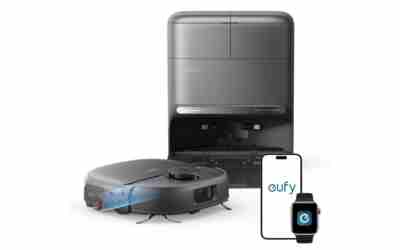
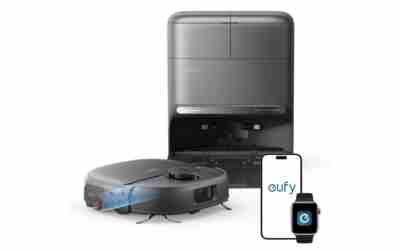
eufy E25 Robot Vacuum with HydroJet Mop

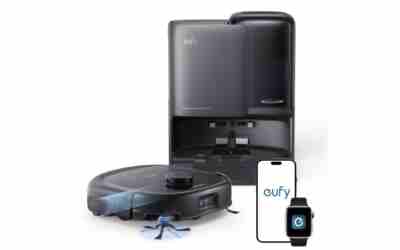
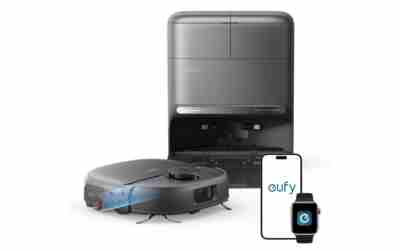
eufy C28 Robot Vacuum and Mop Combo, 15,000 Pa
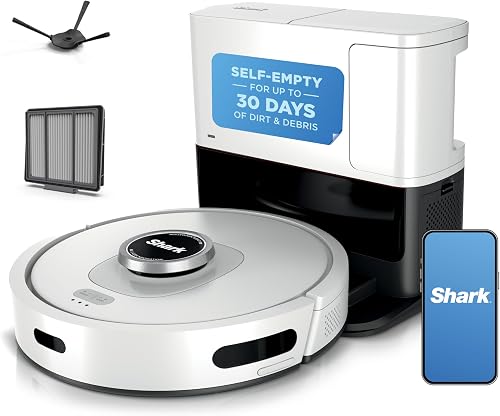
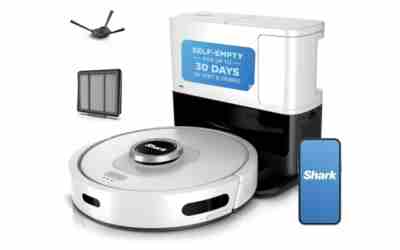
Shark AI Ultra Robot Vacuum AV2511AE
As an Amazon Associate we earn from qualifying purchases. Product prices and availability are accurate as of the date/time indicated.
Frequently Asked Questions
Can the dock go near a window?
Yes, if direct sun does not hit it and the window does not open into the front zone. Strong sun can interfere with the dock’s signal on some models, so watch for a pattern of missed returns in the afternoon. If that happens, close a curtain or blind, or check the manual. Decision rule: near a window is fine, in a sunbeam is not.
How far should the dock be from the Wi-Fi router?
There is no fixed distance. What matters is the signal at the dock itself. Check your phone’s signal where the dock will sit, and if it is weak, move the router, add an extender or choose another wall. Being very close to the router is not required.
Can I use a dock on carpet?
Low, flat carpet may work if your manual allows it, but thick or plush carpet can leave the dock unlevel and make contact with the charging pins unreliable. Hard floor is the safer choice. If carpet is the only option, run the return-to-dock test several times before you trust it.
Is a dock too big for my hallway?
Add the dock’s width to 3.2 ft, which is 1.6 ft per side. If the hallway is narrower than that total, or the 5 ft front zone sits in the main walkway, choose another wall. A hallway with a wide alcove can work.
Can two robots share one dock?
Usually not. Docks are built for specific robots and charge through matching contacts, so a second robot normally needs its own dock. Check the manual for your models. Decision rule: one robot, one dock, unless the manual says otherwise.
{“@context”: “https://schema.org”, “@type”: “FAQPage”, “mainEntity”: [{“@type”: “Question”, “name”: “Can the dock go near a window?”, “acceptedAnswer”: {“@type”: “Answer”, “text”: “Yes, if direct sun does not hit it and the window does not open into the front zone. Strong sun can interfere with the dock’s signal on some models, so watch for a pattern of missed returns in the afternoon. If that happens, close a curtain or blind, or check the manual. Decision rule: near a window is fine, in a sunbeam is not.”}}, {“@type”: “Question”, “name”: “How far should the dock be from the Wi-Fi router?”, “acceptedAnswer”: {“@type”: “Answer”, “text”: “There is no fixed distance. What matters is the signal at the dock itself. Check your phone’s signal where the dock will sit, and if it is weak, move the router, add an extender or choose another wall. Being very close to the router is not required.”}}, {“@type”: “Question”, “name”: “Can I use a dock on carpet?”, “acceptedAnswer”: {“@type”: “Answer”, “text”: “Low, flat carpet may work if your manual allows it, but thick or plush carpet can leave the dock unlevel and make contact with the charging pins unreliable. Hard floor is the safer choice. If carpet is the only option, run the return-to-dock test several times before you trust it.”}}, {“@type”: “Question”, “name”: “Is a dock too big for my hallway?”, “acceptedAnswer”: {“@type”: “Answer”, “text”: “Add the dock’s width to 3.2 ft, which is 1.6 ft per side. If the hallway is narrower than that total, or the 5 ft front zone sits in the main walkway, choose another wall. A hallway with a wide alcove can work.”}}, {“@type”: “Question”, “name”: “Can two robots share one dock?”, “acceptedAnswer”: {“@type”: “Answer”, “text”: “Usually not. Docks are built for specific robots and charge through matching contacts, so a second robot normally needs its own dock. Check the manual for your models. Decision rule: one robot, one dock, unless the manual says otherwise.”}}]}